You've got a Research Agent. It finds anything you ask for.
You've got a Writer Agent. It saves files exactly where you want them. Both are brilliant at what they do.
Now you want something simple: research finds information, writer saves it. One task, two agents.
But here's the problem — they've never met.
They don't know the other exists. Two experts in separate rooms, no door between them.
This is where most people start writing glue code. Hardcoding URLs. Manually passing outputs from one agent to another. It works until you add a third agent. Then a fourth. Then it's spaghetti.
There had to be a better way.
What if agents could simply introduce themselves?
"Hey, I'm Research. I find things on the web."
"Nice to meet you. I'm Writer. Send stuff my way, I'll save it."
No hardcoding. No glue code. Just agents discovering each other and figuring out how to collaborate.
That's exactly what Google built. It's called A2A — Agent to Agent protocol.
In this article, I'll show you how to build a multi-agent system where agents introduce themselves, discover each other's capabilities, and work together cleanly.
What is A2A?
A2A stands for Agent to Agent. It's an open protocol by Google that lets AI agents talk to each other over HTTP.
Think of it like this: every agent gets a business card. The card says who they are, what they can do, and how to reach them. Any other agent can read this card and decide, "Okay, this is who I need for this task."
In A2A, that business card is an Agent Card — a simple JSON file at a well-known URL:
That's it. Name, description, URL, capabilities.
When agents want to work together, they don't need custom integrations. They:
- Fetch the agent card
- Read what the agent can do
- Send a message using a standard format
The message format is JSON-RPC. That's what makes A2A powerful: any agent, built by anyone, in any language, can talk to any other agent — as long as they speak A2A.
Your Python agent can collaborate with someone's JavaScript agent. An agent on your laptop can talk to one on AWS. They just need each other's URLs.
Discovery. Communication. That's A2A in two words.
The Architecture
So agents can introduce themselves. Great. But who talks to who?
You could let every agent talk to every other agent. Research talks to Writer. Writer talks to Research. Add a third agent, now everyone talks to everyone.
That's peer-to-peer. And it's a mess.
With three agents you get six possible connections. A fourth agent makes twelve. A fifth? Twenty.
But connections aren't the real problem. The real problem is every agent needs to know about every other agent, and every agent needs logic to decide "should I handle this or pass it on?" You're duplicating decision-making across the system. When the LLM gets confused about who to delegate to — good luck debugging that.
There's a simpler pattern. One agent is in charge. The rest just do their job.
This is the Host Agent Pattern. Google's official A2A samples use it.
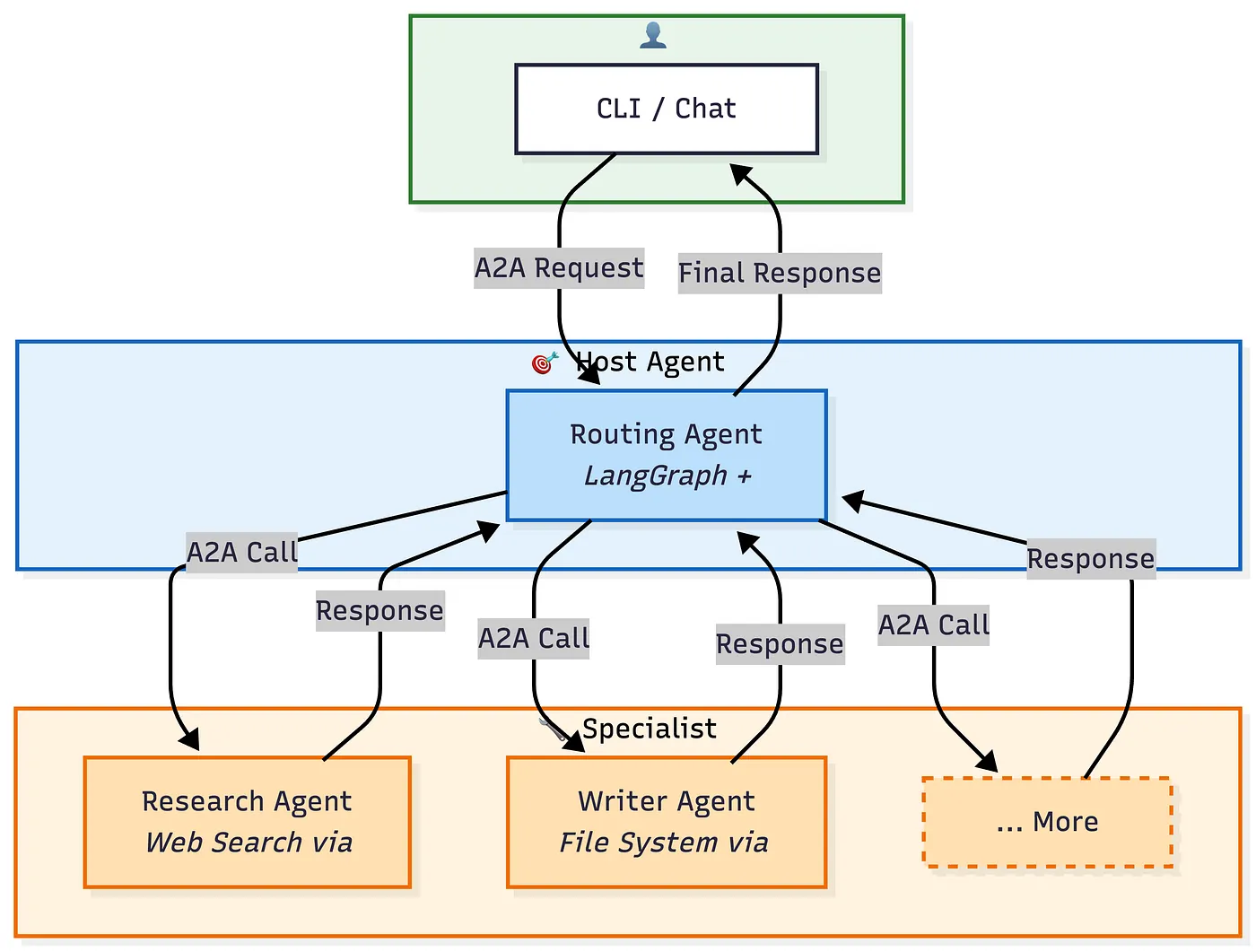
The Routing Agent is the only one that knows about other agents. It fetches their agent cards, understands their capabilities, and decides who handles what.
The specialized agents don't know anyone. They don't need to. They search the web, write files, analyze data — and respond.
Want to add a new agent? Deploy it and tell the Routing Agent its URL. No changes to existing agents. No new connections to wire up.
What we're building:
- Routing Agent (port 8000) — orchestrator. Receives all requests, delegates to specialists
- Research Agent (port 8001) — searches the web (DuckDuckGo)
- Writer Agent (port 8002) — reads and writes files
User talks to Routing Agent. Routing Agent talks to everyone else. Simple chain of command.
Tech Stack
Three main pieces:
- LangGraph — building the agents
- MCP — giving agents tools
- A2A Python SDK — agent communication
LangGraph
LangGraph is a framework for building agents with LLMs. It handles the loop:
- Receive input
- Decide what to do
- Use tools if needed
- Return a response
It also gives us memory out of the box. Each agent can remember previous messages using a simple MemorySaver.
We're using Google's Gemini as the LLM, but you could swap in OpenAI, Anthropic, or another provider.
MCP (Model Context Protocol)
MCP is how we give tools to agents. Instead of hardcoding tool functions, we connect to MCP servers that expose tools.
Examples:
- DuckDuckGo MCP server —
web_search,fetch_content - Filesystem MCP server —
read_file,write_file,edit_file
The agent doesn't know or care how those tools work internally. It just calls them through MCP. That keeps agent code clean and tools reusable.
A2A Python SDK
Google's official SDK for A2A. It gives us:
A2AServer— expose an agent as an A2A endpointA2AClient— send messages to other agentsAgentCard— describe what an agent can do
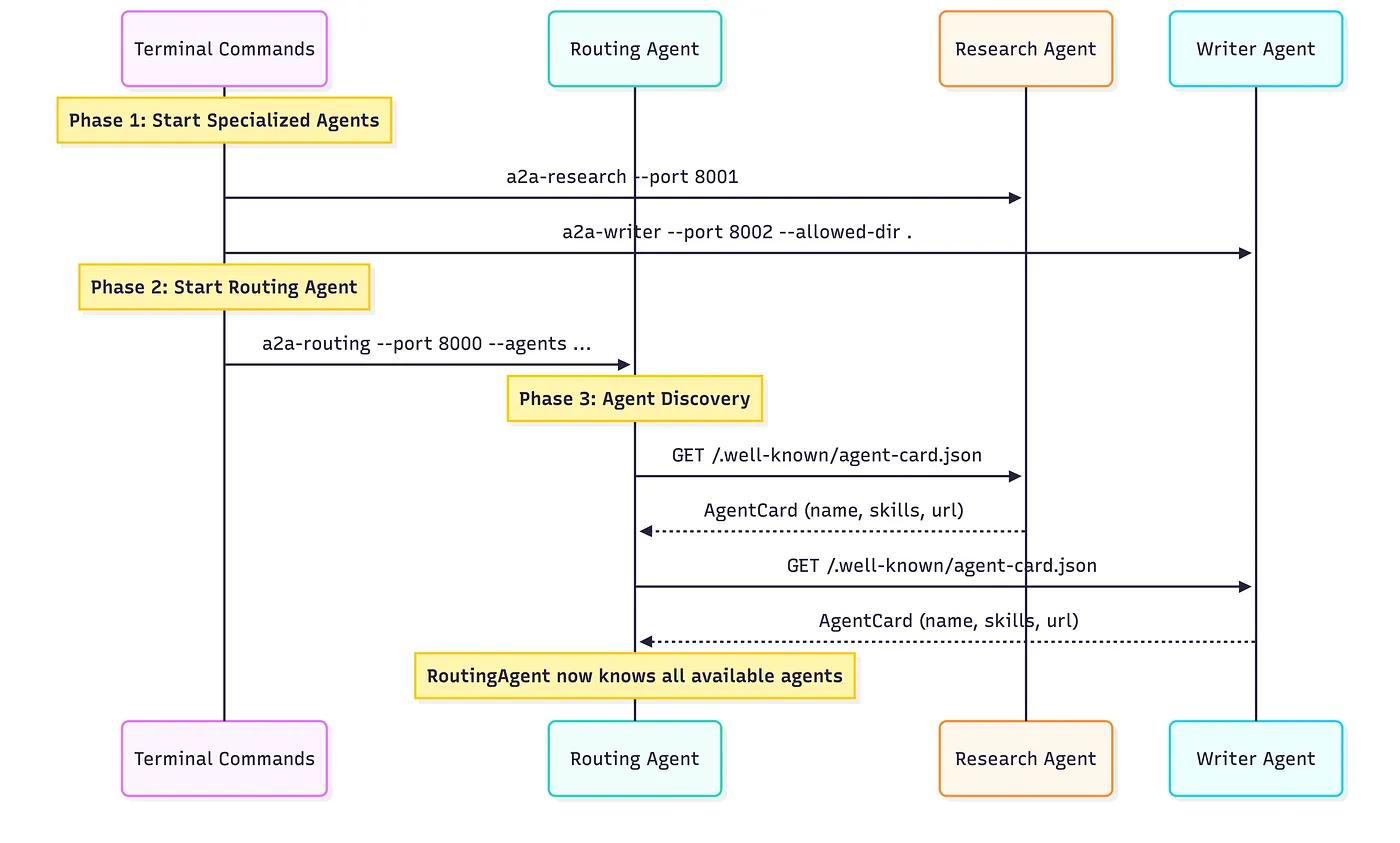
When we start an agent, it serves its agent card at /.well-known/agent-card.json. Other agents fetch that card to discover capabilities.
Building the Agents
Three agents:
- Research — searches the web
- Writer — saves files
- Routing — decides who does what
The Base Agent
Before specialists, we need a foundation. Every agent needs to:
- Start an A2A server (so others can find and talk to it)
- Connect to MCP tools (so it can actually do things)
- Wire up LangGraph (so it can think)
Instead of repeating that three times, we use a base class:
What's going on here:
- name / description — how the agent introduces itself
- skills — what it can do (others read this to decide whether to delegate)
- mcp_command — shell command to start the MCP server for tools
- system_prompt — how the agent thinks
- _memory — LangGraph memory for conversation history
On startup, the agent grabs its tools:
Think of it like walking up to a toolbox (MCP server), looking inside, and grabbing what's there. Tools are discovered at runtime — not hardwired in advance.
Then the thinking loop:
LangGraph's create_react_agent does the heavy lifting. It takes:
- An LLM (Gemini)
- Tools (from MCP)
- Memory (conversation history)
- A system prompt (personality / instructions)
…and returns an agent that can reason, use tools, and respond.
context_id is how the agent remembers previous messages in a conversation.
Research Agent
- The system prompt is the job description.
- The skills list is the resume. When routing asks "who can search the web?", these tags (
search,web,research) make matching easy. uvx ddgs-mcpstarts a DuckDuckGo search server. On setup, the agent connects and gets tools likesearch_web(query).
Writer Agent
allowed_dir matters. The MCP filesystem server restricts all ops to that folder. Safety first — you don't want an agent deleting your home directory.
The command npx @modelcontextprotocol/server-filesystem /tmp/workspace gives tools like read_file(), write_file(), list_directory().
Wrap Each Agent in an A2A Server
An agent sitting in memory can't talk to anyone. Expose it over HTTP:
Research is live at http://localhost:8001. Anyone can:
- Fetch its card at
/.well-known/agent-card.json - Send it tasks via JSON-RPC
Same pattern for Writer on port 8002:
Two servers running. Still no door between them — that's the routing agent's job.
The Agent Registry
The registry is the routing agent's address book: who's available, how to reach them.
The registry can:
- Discover — fetch cards and store connections
- Send messages — route tasks to the right agent
- Summarize — tell the LLM who is available
Link Registry to Routing Agent
The routing agent:
- Takes agent URLs during setup
- Discovers each one through the registry
- Exposes a
send_messagetool LangGraph can call
Start the Routing Agent Server
Routing is live at http://localhost:8000. It knows both specialists and can delegate.
Create a Client
Or an interactive CLI with a session id so the agent remembers the thread:
Startup Sequence
Specialists come up first. Routing discovers them. Then the client can talk.
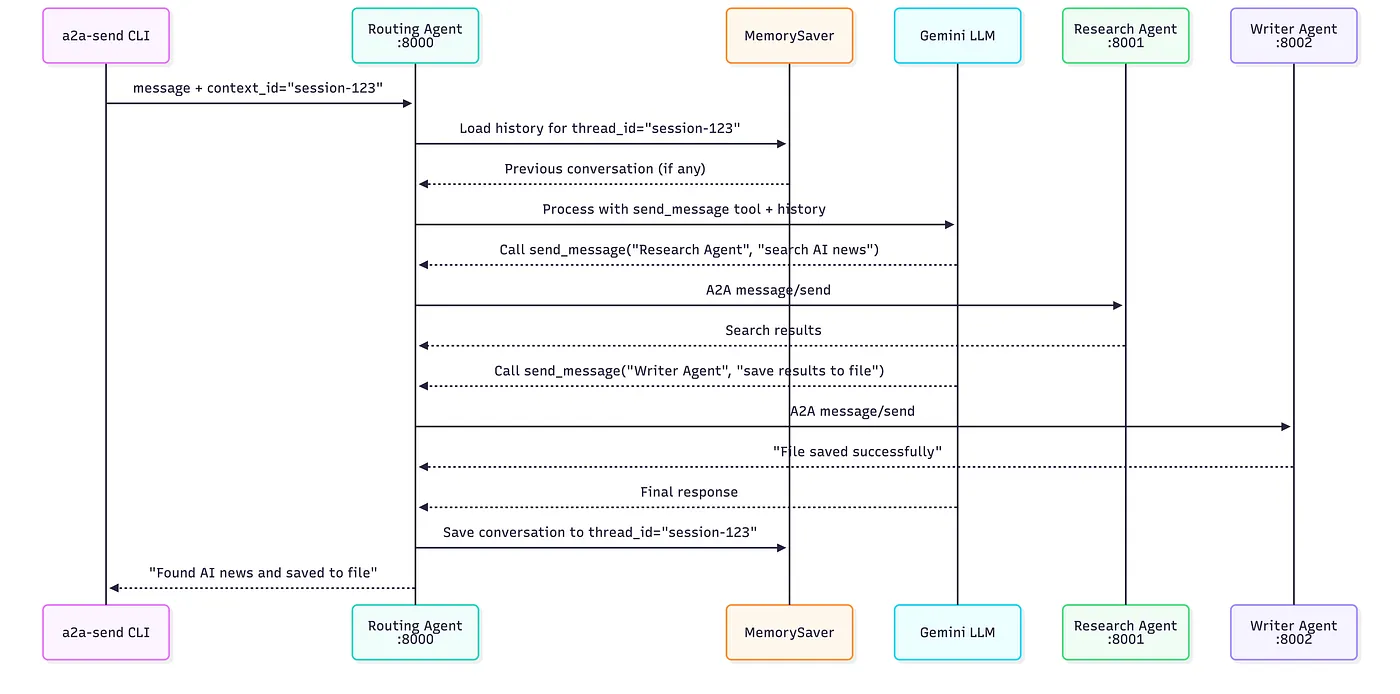
Multi-Agent Task Flow
A single user message becomes load history → model + tools → A2A calls to Research and Writer → save conversation → final answer.
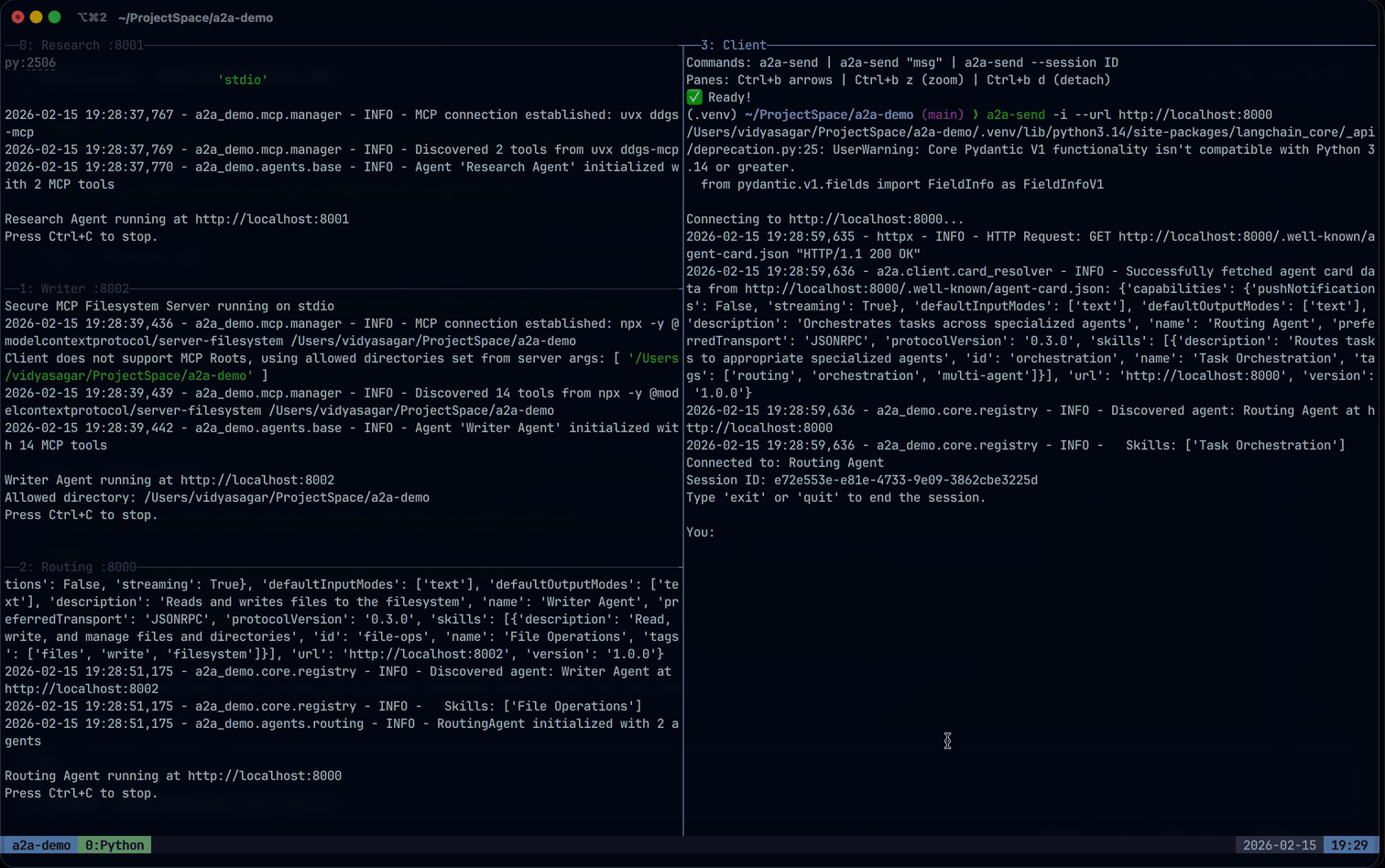
See It in Action
Research, save, and follow-up across agents in one terminal session:
What We Built
A multi-agent system where:
- Agents discover each other through A2A agent cards
- Tools come from MCP — no hardcoding search or file logic
- LangGraph handles reasoning — each agent thinks independently
- The routing agent orchestrates — delegates based on skills, not brittle rules
The specialists stay small. Routing is basically an LLM with one tool: send_message.
That's the point.
- A2A handles communication
- MCP handles tools
- LangGraph handles thinking and memory
You wire them together.
What you can build next
- More specialists (code writer, data analyst, email sender)
- Different MCP servers (databases, APIs, browsers)
- Agents across machines — A2A doesn't care where they run
- Agent marketplaces where anyone can publish and discover agents
The future isn't one super-agent that does everything. It's many small agents that do one thing well — and talk to each other.
Links
Thanks for reading.